Grafyk Font: A Handwritten Script for Handmade Products
I was sitting at my worktable last weekend, tweaking a candle label design for the third time. The wax had set, the fragrance was perfect, but the label text felt stiff. I needed a wordmark that felt warm and handmade, something that matched the care I put into each pour. That is when I tried Grafyk, and the difference was immediate. The letters had movement, bounce, and a natural hand-drawn rhythm that made the label feel like part of the product rather than an afterthought.
What Makes Grafyk Stand Out for Makers
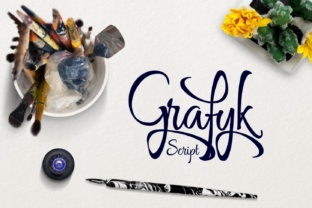
Grafyk is a bold and bouncy script font with a calligraphic feel that does not require any calligraphy skill to use. It looks like it was written with a confident hand, but the letters are clean enough to read at a glance. The strokes have weight without being heavy, and the bounce between characters creates a lively rhythm that works beautifully for short phrases, names, titles, and decorative wording.
For anyone making products by hand, this font brings a handmade feeling to labels, tags, packaging, and printables without needing to actually write each letter yourself. It gives you that human touch with digital convenience. The character shapes are generous and open, which means they hold up well when printed small on stickers or scaled large on signs.
Seeing Grafyk Come to Life on Real Products
The first place I used Grafyk was on a set of soy candle labels. I wanted the scent name to feel personal, like I had written it myself. I typed "Vanilla + Cedar" and immediately noticed how the letters connected naturally. The swashes were subtle, and the overall look was modern without being cold. I printed a test sheet, cut the labels by hand, and stuck one onto a finished candle. It looked like it belonged there.
From there, I started using Grafyk on other products in my shop:
- Greeting cards for birthdays and thank-you notes. The script works well inside a card for a short message or as a cover title paired with a simple illustration.
- Wedding invitation suites where the couple wants something elegant but not overly formal. Grafyk adds a romantic, handcrafted feel without looking fussy or outdated.
- Printable wall art with motivational quotes. The bold weight gives the words presence on the wall, and the bounce keeps the design from feeling too serious.
- Product tags and hang tags for boutique items. I printed a small batch of tags with Grafyk for a friend who sews aprons, and they looked like they came from a high-end shop.
- Gift tags for holiday packaging. The script reads clearly even at a small size, which is essential when you are making dozens of tags in one sitting.
How Grafyk Affects Product Presentation and Customer Perception
When a customer picks up a handmade product, the first thing they notice is the packaging. A thoughtfully designed label or tag signals quality before they even open the item. Grafyk helps you achieve that signal. The script looks intentional and crafted, which tells the buyer that you care about details.
For shop branding, using the same script across your product labels, stickers, business cards, and social media graphics creates a consistent identity. Customers start to recognize your style. When they see that same handwritten look on a tote bag or a mug in your shop, they feel a sense of familiarity. It strengthens your brand without requiring you to design a new look for every product.
I have also noticed that Grafyk works well for emotional appeal. For items like wedding invitations, baby shower cards, or personalized gifts, the script adds warmth and sincerity. It makes the message feel more personal, as if you took the time to handwrite it.
Practical Tips for Using Grafyk with Cutting Machines and Small Products
If you use a Cricut or Silhouette to cut vinyl or print-and-cut stickers, Grafyk is a solid choice, but there are a few things to keep in mind. The bold weight helps the letters hold their shape when cut small. However, I recommend testing at your intended size before cutting a full sheet. For small stickers under one inch, the thicker strokes are fine, but the connecting strokes between letters may get narrow. I have had good results sizing my text at least 0.5 inches tall for adhesive vinyl and slightly larger for heat transfer on fabric.
For printable sticker paper, I always do a test print on plain paper first. This lets me check that the letters are readable and that the spacing looks right. Grafyk comes with clean letterforms, so I have rarely needed to adjust kerning manually, but it is worth looking at problem pairs like "ff" or "ll" if they appear in your text.
For mugs and shirts, the bold script works well because it remains legible from a distance. I designed a small batch of tote bags with a single word printed in Grafyk, and the letters read clearly even from across a craft fair table.
Font Pairing Ideas That Work with Grafyk
Grafyk is a display script, which means it shines when paired with a simpler counterpart. Here are some pairings I have tried successfully:
- Clean sans serif font for body text on invitations or product descriptions. The contrast between the bouncy script and a neutral sans serif keeps the design balanced.
- Simple serif font for a more traditional look on wedding stationery. The serif adds structure while Grafyk adds personality.
- Thin handwritten font for layered typography on labels or wall art. The two handwritten styles can coexist if one is bolder and the other is lighter.
- Bold display font for headlines where you want Grafyk to accent a single word or phrase within a larger title.
I usually reserve Grafyk for the main headline, the product name, or the decorative phrase. Then I use a simple sans serif for the details. This keeps the design from feeling crowded and lets the script do the heavy lifting.
Licensing, File Formats, and What to Check Before You Sell
Before you use Grafyk on physical products, templates, printables, or digital downloads, it is essential to check the commercial font licensing. Script handwritten fonts like Grafyk are often sold with different license tiers, so read the terms carefully. Some licenses cover physical products up to a certain number of sales, while others require an extended license for mass production or digital distribution.
If you plan to sell editable templates on Etsy or Creative Market, make sure the license allows embedding the font in a file that customers will edit. Similarly, if you are creating SVG-style designs, layered cut files, or print-on-demand merchandise, confirm that the license covers those use cases.
Grafyk may come with multiple file formats including OTF, TTF, and WOFF. For most print work, OTF is the better choice because it supports ligatures and swashes more reliably. If the font includes stylistic alternates, ligatures, or swashes, you can access them through the OpenType panel in design software like Adobe Illustrator or Affinity Designer. These extras are what make the script look truly handcrafted, so take advantage of them when designing your product labels and branding materials.
Multilingual support is another factor if you sell to international customers. Check whether the font includes accented characters for languages like French, Spanish, or German. This can save you from having to switch fonts mid-project when a customer requests a custom order.
Where Grafyk Fits into Your Product Line
Whether you are designing for candle labels, wedding invitations, planner pages, tote bags, or seasonal craft products, Grafyk brings a consistent handmade energy to your work. It is bold enough to stand alone on a tag and refined enough to pair with other typefaces on a full invitation suite.
For makers who want their products to feel personal without handwriting every label, Grafyk offers a practical middle ground. It looks like you took the time to write it, but it takes you only a few seconds to type. That combination of efficiency and handcrafted charm is hard to find in a single font, and it is exactly what keeps me coming back to Grafyk for my shop projects.
If you are building your brand identity or just starting to design your own packaging, try Grafyk on a mockup first. Type your product name, adjust the size, and see how the letters sit together. Chances are, you will recognize that same feeling I had with my candle labels: the font finally matches the effort you put into your product.